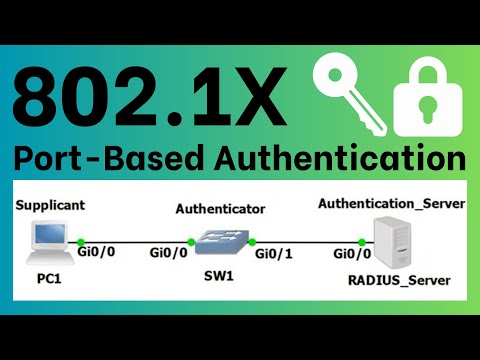
IMPORTANT NOTE: At 14:47 we want to set the authentication method to "RADIUS, None" not "None". This uses RADIUS authentication and keeps the port authenticated even if the RADIUS server is not available. Brandon Harp was kind enough to point out my misunderstanding here. Thanks Brandon! I put together a script that can be run as a cron job on a Linux device that will generate a private key, create a CSR request, submit that request to your Windows CA, download the new certificate file and restart a service. I made it for replacing an HTTPS certificate however it should work across the board. Securing RADIUS with EAP-TLS (Wired WPA2- Enterprise) [Windows Server 2019] I (tobor), demonstrate how to secure RADIUS using EAP-TLS on wired devices using an capable Cisco switch. If you like what you see please Subscribe! ENABLE RADIUS ACCOUNTING aaa accounting dot1x start-stop group radius SET UP RADIUS SERVER USING CLI radius host auth-port 1812 acct-port 1813 timeout 3 retransmit 3 deadtime 0 key MySharedSecret1 priority 0 usage dot1.x ENABLE PORT-BASED AUTHENTICATION dot1x system-auth-control aaa authentication dot1x default none ENABLE ON A SINGLE PORT interface gigabitEthernet0/1 dot1x authentication CONFIGURE HOST MODE ON PORT enable configure terminal interface gigabitethernet0/1 dot1x host-mode multi-host # OR access-session host-mode multi-host MULTIPLE AUTHENTICATION ( and devices) interface gigabitethernet0/1 dot1x host-mode multi-host dot1x port-control auto # OR access-session host-mode multi-auth authentication port-control auto end show access-session interface interface-id MULTI-DOMAIN AUTHENTICATION ( Devices) interface gigabitethernet0/1 switchport access vlan 110 switchport voice vlan 110 no ip address authentication host-mode multi-domain authentication port-control auto mab # To set the interface Port Access Entity to act only as an authenticator and ignore messages meant for a supplicant dot1x pae authenticator 0:00 Intro Summary and Recap of Part 1 1:07 Add Capable Switch as NPS Client 2:06 Add Ethernet to NPS Connection Request Policy 2:42 Add Ethernet and Security Groups to NPS Network Policies 6:03 Configure Group Policy Wired Network Profile 10:19 Signing into Switch on SSH and HTTPS 10:57 Configure Accounting Levels 12:01 Add RADIUS Server to Table 14:04 Enable Port Based Authentication Usage 14:47 Set Authentication Method to RADIUS, None 16:00 Enable SNMP Traps for Success and Failure of 16:34 Guest VLAN Comment 17:09 Port Authentication Overview 18:53 Enable usage on an interface 19:43 Set Administrative Port Control Value 20:41 Host and Session Authentication Overview 23:00 Define the host mode for an interface 23:21 Overview of everything we configured on the switch 25:37 Outro Thanks for Watching! CISCO RADIUS DOCs - - View my Verified Certifications! Follow us on GitHub! Official Site Give Respect on HackTheBox! Like us on Facebook! View PS Gallery Modules! The . Security Package
- 24230Просмотров
- 4 года назадОпубликованоOsbornePro TV
Securing RADIUS with EAP-TLS (Wired WPA2- Enterprise) [Windows Server 2019]
Похожее видео






Популярное
Новини