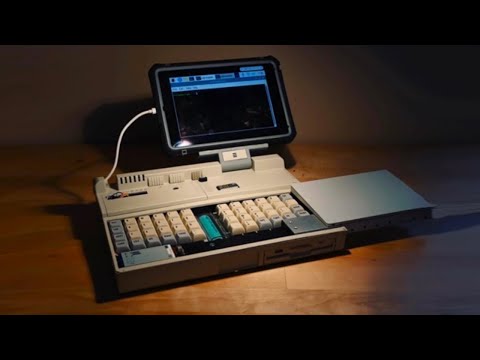
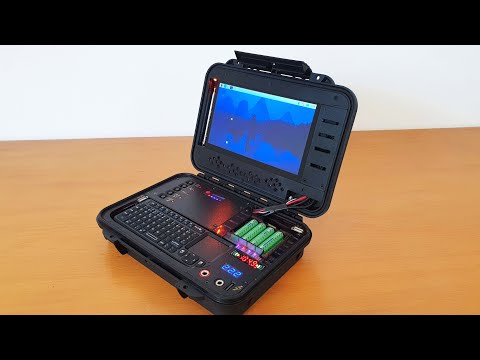
For this cyberdeck build I am using a NOS (New Old Stock) enclosure from 1953 (Suckle Electronics. made for the U.S. Army Signal Corp to hold spare parts) The panels that hold the HDMI and keyboard is made from FR4 circuit boards. It's a pretty standard build, but the vintage enclosure adds quite a bit of flair :) Inside, there is a 8 Gb Raspberry Pi 5, a Pimorini NVMe base (that holds a 500Gb NVMe SSD). I'm using an actively cooled aluminium heatsink on the Pi, but I have also added a secondary 30mm fan for venting the metal enclosure. The monitor is a standard 7" USB powered HDMI screen. The dimensions are 26 x 12 x 7 cm. I bought some chinese panel mount extensions for ethernet, USB A and power (USB C). Unfortunately none of the USB C cables from Ali Express worked for power delivery. I am currently running this on external power, but there is space inside for a decent sized power bank (I just have to find one that fits and that also allows for power delivery while charging) There is no copper on the FR4 panels and wifi reception is ok. Since the Pi chipset doesn't allow wifi to be configured for monitor mode, I also got an AC1300 dual band wifi adapter (that should play nice with Kali). The "self destruct" button is not connected to anything yet, but I will most likely hook it up to the GPIO header and trigger some sort of animation / sound effect when it is pushed. Notes: OS Installation on the SSD: The easiest way to install a linux distro on the SSD is to 1) First use the Raspberry pi imager to write Pi OS to an SD card. 2) Boot raspberry pi OS and run raspi-config to change the boot order, so that it attempts to use the NVME disk first. 3) Download your OS of choice. 3) And then run the Raspberry pi imager on the raspberry and have it write the OS to your SSD Fan: Depending on your OS, it may or may not support a PWM operated fan. The Pi will run quite hot if the fan is not running. Instead of fiddling around with config settings, trigger levels and hysteresis - I just cut the _yellow_ wire on my RB-ALUCASEP5-07-FAN aluminium cooler for my Pi. The fan will then run at full power as long as power is applied to the Pi.
- 47051Просмотров
- 1 год назадОпубликованоTime Expander
Building a Mini Pi5 Cyberdeck Running Kali Linux
Похожее видео




Популярное
Новини