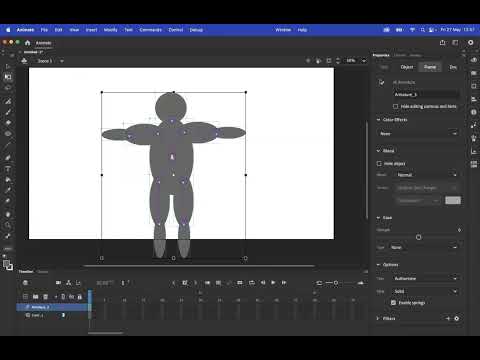
Watch the better version here: #adobeanimate #adobeanimatetutorial #characteranimation #bonetool #characterrigging #adobeanimate Today, we're in Adobe Animate taking a look at rigging a basic character using the bone tool. We apply proportional speed to our character's limbs and limit or constrain their movement based on more realistic limits (like your elbow only bending one way!) Let's do it! 00:00 Intro 00:19 Tutorial Begins 00:29 Making Your Character From Symbols 00:57 Correctly Positioning Anchor Points 01:47 Rigging Using the Bone Tool 03:38 Adding Null Objects for Extra Control 05:01 Correct Layer Positioning 06:06 Change the Armature View Mode 06:44 Limiting & Constraining Joint Movement 07:58 Proportional Speed for Limb Movement 09:37 Pinning Bones in Place for Unique Control 10:53 Tweaking Control Points to Fix Elbows and Knees 12:29 Limiting Rotation & Translation Amounts 16:41 Armature Animation 20:19 Member Shoutouts If you found this video useful, consider subscribing or joining this channel to get access to perks such as badges and shout outs in videos: ______ Thanks for watching! Join this channel to get access to perks such as badges and shout outs in videos: Subscribe: TipTut: Website & Resources: Social Media: Facebook: Twitter: Instagram: Dribbble:
- 337040Просмотров
- 5 лет назадОпубликованоTipTut
Character Rigging in Adobe Animate (OLD - New Video in Desc)
Похожее видео







Популярное
Новини