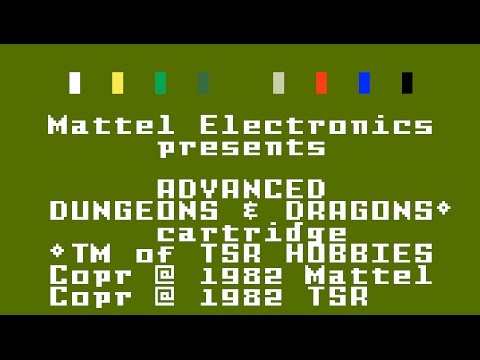
This is a follow-up video to the one I posted in January 2023, where I demonstrated installing my Portable Intellivision Development Environment onto a new device. Because I actually use this environment that I built for myself, I am naturally aware of any changes since my last version of the documentation went live on my website. There are two changes that I thought I would share since I posted the original January 2023 video. First, I switched to a different VNC client. The one I am now using is AVNC, and it's distributed through F-Droid, same as Termux. Second, I made an update to PIDEjL and PIDEGS. PIDEjL is my Portable Intellivision Development Environment jzIntv Launcher, the tool I created to launch Intellivision games in jzIntv. It has a Windows port, which I also updated. PIDEGS is my PIDE Graphical Suite, a separate tool that I use for managing all my Intellivision game projects. The updates to these tools are: - You can now select a custom graphics mode in addition to the ones built into jzIntv. - The list of built-in graphics modes is now an Option Menu instead of a stack of Radio Buttons, reducing the size of the Graphics Options frame, despite the extra functionality. - The Sound Options frame is moved to the bottom left corner, taking advantage of the reduction of the Graphics Options frame's size. - Where the Sound Options frame used to be, I added a new System Options frame. Within this frame is another new feature ... - You can now choose which Executive ROM and Graphics ROM image you want to use. In addition, if you select a game that you had configured to take advantage of additional Graphics RAM, PIDEjL will now select a different Executive ROM image for you, and possibly a different Graphics ROM image as well. PIDEGS also has additional logic for the "Tutorvision Mode" checkbox. The latter part of this video is my demonstration of the difference between the two Graphics ROM files and among the four Executive ROM files. First, I open Advanced Dungeons & Dragons (Cloudy Mountain) and compare title screens. With the newer Graphics ROM image, the system font changes, and the "Mattel Electronics presents" title screen text is replaced with "INTV Corporation presents". Asterisks also look like asterisks, as opposed to diamonds with a hole in the middle. You can also see a single pixel from the asterisk at the far right of the screen is truncated. For this video's thumbnail image, I selected a video frame in which I have the mouse pointer hovering over that asterisk, though it's probably too small for you to see. Re-opening AD&D with the Executive ROM image for the World Book Tutorvision, which had a slightly modified graphics chip, the STIC1A, causes the asterisk at the far right side of the title screen to no longer have a truncated pixel. That's because jzIntv emulates the STIC1A instead of the standard STIC when this Executive ROM image is used. Switching to the Sears Super Video Arcade Executive ROM image and back to the standard Mattel Electronics Graphics ROM image, AD&D now displays a garbled game title. What's happening is that "ADVANCED DUNGEONS & DRAGONS" doesn't fit into a single 20-character line, and so the cartridge ROM header has only "DUNGEONS & DRAGONS" as its title, which can be seen in the jzIntv title bar. Additional code is used to print the word "ADVANCED" in what is normally the line above the title, after the game title is printed. The Sears Super Video Arcade had a slight change to display the title one line higher than normal, closer to the middle of the screen, and so the word "ADVANCED" overlays the "DUNGEONS & DRAGONS" text. To demonstrate the difference in the Intellivision II Executive ROM, I switch to Carnival, one of the games released by Coleco. The box image displays the sticker with the advisory that Carnival is not compatible with the Intellivision II. When the emulation window appears, all we see is a solid color on the screen. Finally, I re-open Carnival with the standard Master Component Executive ROM image, and it works just fine. Earlier in the video, I explain that the name "Master Component" comes from the original Intellivision console, so called because it was designed from the very beginning to be connected to a Keyboard Component to transform the Intellivision into a full-blown home computer. PIDEjL for Windows, along with PIDEjL/PIDEGS for my Portable Intellivision Development Environment, are both available from my website,
- 132Просмотров
- 2 года назадОпубликованоMichael Hayes
Portable Intellivision Development Environment - Summer 2023 Update
Похожее видео








Популярное
Новини