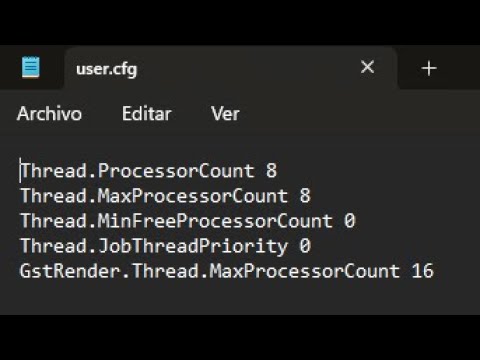
Quick video on How to make a config file ( ) in Battlefield 6. Such things as getting more fps or an in-game fps counter can be done using one, config commands mentioned below :) Remember to change to YOUR Resolution and CPU configuration :) For 3840 x 2160 3840 2160 1 0 0 0 1 3 4 3580 -65 0 8 8 0 0 16 For 2560x1440 2560 1440 1 0 0 0 1 3 3 2365 -50 0 8 8 0 0 16 For 1920x1080 1920 1080 1 0 0 0 1 3 3 1725 -50 0 8 8 0 0 16 Timestamps: 00:00 Intro 00:22 What the commands do... 02:42 Fps Gain 03:52 Lower CPU Usage 05:56 How to make a Config File Some other content you may enjoy: BEST WEAPONS for EACH CLASS 2023: MISTAKES Battlefield Players MAKE: ACCURACY with RANDOM Recoil: FINAL BFV SETTINGS: HOW to FIND your SENSITIVITY: 2042 Future Frame Rendering ON v OFF: HOW to IMPROVE in BATTLEFIELD: IMPROVE POSITIONING: CONSOLE to PC GUIDE: LOW FoV Vs. HIGH FoV FPS Comparison: Subscribe if you haven't already :) Follow on Twitter; @_drewij Twitch drewij #Battlefield6 #config #bf6 #pc PC SPECS - Current CPU: AMD 7800x3D GPU: RTX 3070Ti Gigabyte Gaming OC RAM: Corsair Dominator Platinum RGB 64GB DDR5 6000MHz MOTHERBOARD: ASUS ROG STRIX Z670-E CASE: CORSAIR OBSIDIAN 500D SE CASE COOLER: CORSAIR H100x POWER SUPPLY: Corsair 850W RMx SERIES Mouse: Endgame XM1R Mousepad: Razer Gigantus Keyboard: Corsair K65 (60% Keyboard) Monitor: ASUS ROG Swift PG279QM 1440p @240Hz 2nd Monitor: ASUS ROG Strix XG248Q 1080p @240 Hz Headset: Logitech G433 Mic: Blue Snowball
- 46487Просмотров
- 2 месяца назадОпубликованоdrewij
HOW to MAKE a CONFIG File in Battlefield 6 - LOWER CPU Usage, MORE FPS, FPS COUNTER
Похожее видео



Популярное
Новини