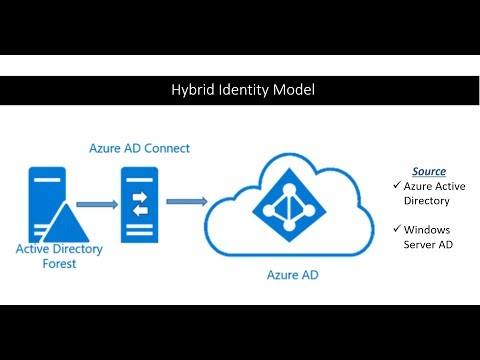
If you or your company is interested in deploying Microsoft Azure SSO solutions, or you’re planning to move towards a hybrid or full cloud infrastructure in the future, syncing your local active directory with Microsoft’s Azure AD is a great first step. In today’s video we are going to do just that by syncing Microsoft Active Directory On-Prem with Azure AD using Azure AD Connect. ⌚TIMESTAMPS 00:00 - Intro 00:24 - Use Cases 01:04 - Add UPN Suffix, Prep Domains 03:10 - Install and Configure Azure AD Connect 04:45 - Force Sync with Powershell Commands 05:30 - Test User Login to PC and Outlook 06:03 - Recap 06:27 - Outro 📚RESOURCES - Microsoft AD Connect Download: - Manually force Azure sync with Powershell: Import-Module ADSync Start-ADSyncSyncCycle -PolicyType Delta Thanks for watching! 🔔 SUBSCRIBE ON YOUTUBE - 🔽 CONNECT WITH ME - Instagram: - TikTok: @zakjaeb - LinkedIn: 🎥 MY CAMERA GEAR: - My camera: - SD card: - Camera microphone: - Voiceover microphone: - Headphones: - Vlogging tripod: - Large tripod: DISCLAIMER: Links included in this description might be affiliate links. If you purchase a product or service with the links that I provide I may receive a small commission. There is no additional charge to you! Thank you for supporting my channel so I can continue to provide you with free content each month.
- 29738Просмотров
- 2 года назадОпубликованоZak Jaeb
How to Sync Microsoft Active Directory with Azure AD
Похожее видео







Популярное
Новини